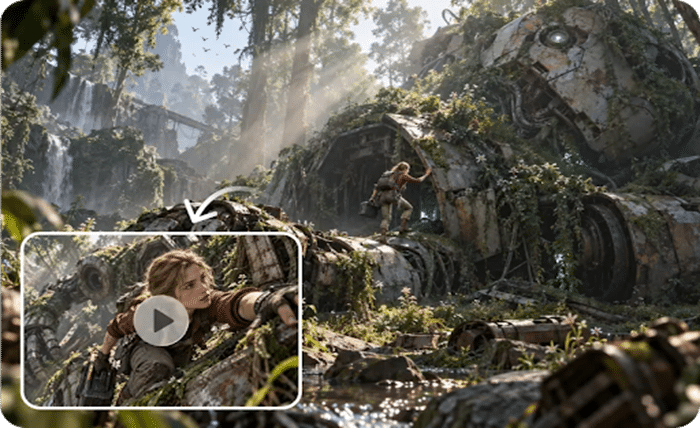
Worldbuilding for a fantasy novel can start with a basic concept. This quickly grows into a myriad of interrelated visual choices. Architecture, creatures, landscapes, props, characters, weather, and atmospheric effects can be included in one setting. With traditional 3D workflows, creators typically have to model or obtain individual assets. This is done prior to testing the full environment. It can take time, and the world’s identity is not clear. A scene-level approach allows creators to work with spatial relationships in the scene before building assets. Pippit can accompany this early exploration with concepts, scripts, references, and visual scenes.
Why Fantasy Worldbuilding Becomes an Asset Management Problem
In a fantasy scene, you will seldom find truly independent objects. All elements influence the other elements. An AI video generator can create a pretty video. However, to create a world, one needs greater command of the spatial relationships. Terrain affects architecture; architecture affects character movement. Character scale has an impact on the viewer’s perception of the environment as well. The use of props can help to build up a culture; lighting can impact the way materials and forms are presented. These connections can be lost in managing each asset alone. At the scene level, the planning process maintains the overview of the world and leaves the details open. This also helps to avoid any hasty asset disposition that could be subject to future modifications.

The World-Model Approach to Fantasy Environments
The next 3D world-model direction embodied by Seeworld is about connected spaces. It’s not just about assets, but about something more as the unit of creativity. Its described method is based on navigable 3D environments and multiple viewpoints. It also features layout control and reference-guided generation. A fantasy author might explore the connections between castles, mountains, roads, villages, and characters. White-mesh views can remove color and texture from the scene. This simplifies the inspection of geometry, scale, depth, and composition. Reference-guided generation can set up an original visual direction based on the existing concepts. These capabilities are still a proposed direction since the system is not publicly released.

Design the World Before Designing Every Object
Use general rules of world-building and then add in place and place. Only add inhabitants and surface details once the structure is clear. Firstly, set climate, geography, civilization, technology, magic, and overall scale. These rules influence all subsequent visual choices. Next, choose a landmark that represents the world. Floating cities, ancient temples, alien forests, castles, and underground kingdoms, among others. Next, plan routes, changes in elevation, entries, exits, distances, and points of interest. Position characters/creatures based on social structure and physical geography. Finally, create materials, colours, textures, costumes, and surface treatments.
- World rule: Climate, Geography, Civilization, Technology, Magic, and Scale.
- Landmark: Select a site with the highest visual identity for the world.
- Spatial logic: Create pathways, elevations, distances, entrances/exits, and focus points.
- Character placement: Place inhabitants, heroes, creatures and supporting figures in the environment.
- Surface treatment: Further develop colours, textures, materials, costumes, and environmental details after the structure is done.
This sequence prevents locking the concept up too early with detailed modelling. It also helps to maintain the gaze on the bigger identity of the world.
Steps to Explore Fantasy Worlds in Seeworld Without Modeling Each Asset
Step 1: Design Your Fantasy Realm
1. Sign up for Pippit with Google, TikTok, or Facebook information before exploring your fantasy world.
2. Open the “Story Studio” tab from the left vertical menu to begin building your environment.
3. Upload your world script through “Upload script”, or choose “Paste script” to insert written worldbuilding.
4. Use “AI scriptwriter” from the top menu to create narratives, environments, characters, or adventure sequences.
5. Choose a fantasy treatment through “Style library” at the dialogue box’s bottom-left area for consistency.
6. Select “Default ratio” for your preferred aspect ratio, then use “Episodes” for multiple world sections.
7. Finally, click “Generate” to let AI develop your fantasy script and organize its world progression.
Step 2: Build Your Fantasy World Assets
1. Use “Creative Canvas” to add images, scene videos, audio, and characters across your fantasy environments
2. Write prompts describing character looks, settings, lighting, camera angles, styles, voice tones, moods, and context
3. After assigning roles and generating characters and scenes, click “Batch generate” to create episodes efficiently.
Step 3: Review and Refine Your Fantasy Episodes
1. Review each episode and refine characters, roles, scenes, and audio until the fantasy world feels coherent
2. When satisfied, click “Select all”, then “Download” to save generated episodes safely onto your device.
Six Layers of a Believable Fantasy World
A good fantasy world must have a weave of layers, not a hodgepodge of decorative pieces. Geography sets up mountains, forests, oceans, valleys, islands, and big environmental formations. It provides the world with a base other than personal property. Architectural forms should be in harmony with culture, climate, technology, history, and available materials. The number of characters must be assigned to spaces based on roles, movement patterns, and social structures. They are also able to show the size of the environment. Landmarks are memorable points of reference that aid the viewer’s comprehension of location. They also help with camera composition and progression of the narrative. Atmosphere: weather, fog, lighting, effects, and time of day. A uniform atmosphere can tie together various settings that are part of a single fictional world. Camera view shows scale, depth, and odd spatial properties. Should reveal, not obscure, significant relationships.
Pippit for Turning Fantasy Worldbuilding Into Visual Narratives
Pippit can connect ideas in worldbuilding – written and visual. It does this without having to start every creative decision with detailed asset construction. Story Studio gives you narrative structure for characters, setting, scenes, and episodes. Creative Canvas provides direction for images, video, audio, and character roles. Visual intent can be maintained between various features within a scene using specific prompts. They are able to identify regular features, settings, lighting, arrangement and atmosphere. Using episode generation can take a fantasy idea and develop it into a series of episodes. This will help to avoid having a random visual output for each scene. The workflow is appropriate for initial visualization, story development, and promotional concepts. It also assists creators in creating references prior to making final production judgements.
Conclusion
When environments are connected systems, it makes world building in fantasy a bit easier. Geography, architecture, characters, landmarks, atmosphere, and camera perspective should support the shared fictional logic. The presented 3D world-model method is a direction to spatial exploration in the future. Creators were able to analyze environments and then manually tweak each object. But that intended course is not a release to the public. Pippit is a practical guide to creating fantasy stories and visual scene references. It can be used to support ideas as the world is still changing. The three keys to good world building are spatial relationships, purpose of the story, and consistency of the images. It is not just related to the number of objects modeled